Help Article

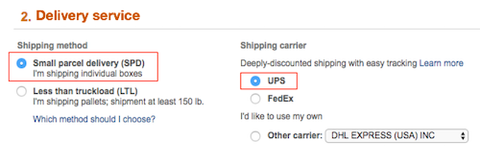
Select SPD and UPS in your Seller Central account located under Section 2: Delivery Service

Amazon Delivery service step with Small parcel delivery (SPD) method and UPS carrier highlighted in red boxes.

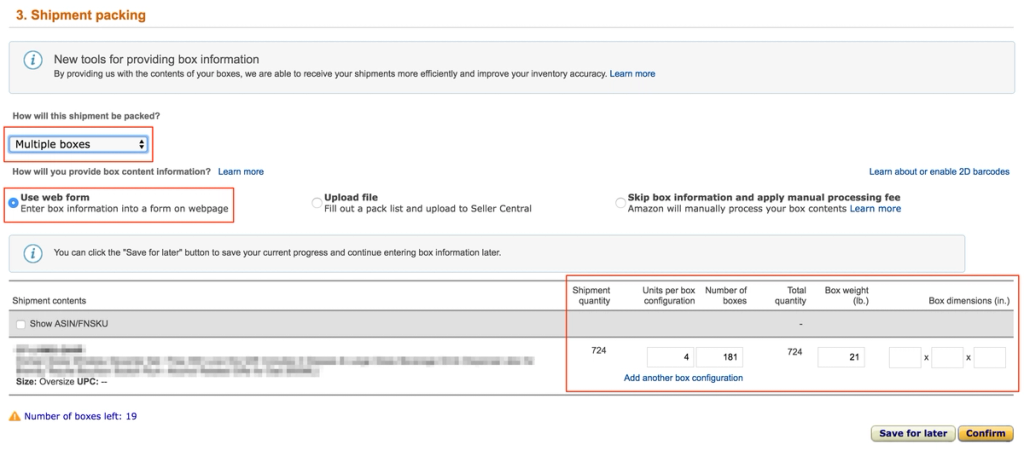
Complete Section 3. Shipment Packing:

  • Select “Multiple boxes” from the dropdown menu.
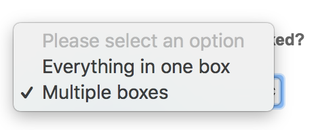
 

Amazon Seller Central packing dropdown with options Everything in one box and Multiple boxes, the latter checked

Select “Use web form.” Complete the form, including the box weight (box dimensions are optional). Click Confirm

Amazon Seller Central Shipment packing step with Multiple boxes and Use web form selected and a box configuration row highlighted in red.

Click Accept Charges under Section 4: Shipping Charges.
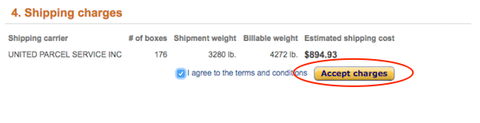
Amazon shipping charges step showing UPS carrier, 176 boxes, billable weight and $894.93 estimated cost with the Accept charges button circled

Click Print Box Labels under Section 5: Shipping Labels. Download the box labels and send them to your supplier so they can label them at origin. 
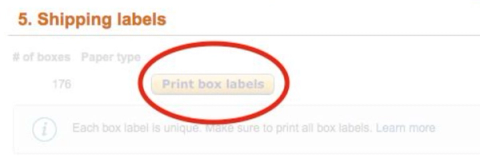
Amazon shipping labels step for 176 boxes with the Print box labels button circled in red

Flexport will pick up your labeled cartons from the air/ocean port and hand them to a local parcel delivery driver.
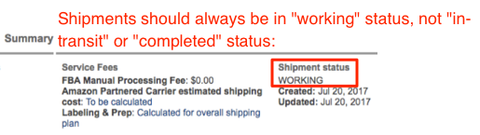
Amazon shipment Summary panel noting shipment status should stay WORKING, with the WORKING status field highlighted in red.

Back to: Selecting Your Final Amazon Delivery Method (EU)

Next: Sending a Quote Request to Flexport (US/Canada and EU)